Intersect Cloud
  • 0 Shopping Cart
  • Home
  • Store
    • Browse All
    • Intersect Server Hosting (NA East)
    • Intersect Server Hosting (EU West)
  • Knowledgebase
  • More
  • Account
    • Login
    • Forgot Password?
  1. Portal Home
  2. Knowledgebase
  3. Server Administration
  4. How to Start, Stop, and Restart your Server

  Categories

Billing and Service Management
6
Intersect Beta 7
1
Intersect Beta 8
2
Server Administration
7

  Categories

  Support

My Support Tickets
Knowledgebase

How to Start, Stop, and Restart your Server Print

  • 0

Login to the server management control panel.  If you have trouble logging in we have instructions for resetting your password here.

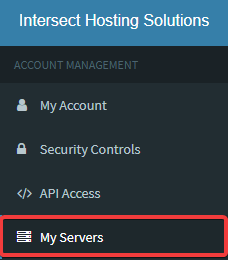
Click on "My Servers" in the Panel Navigation Sidebar:

Click on the server you want to manage on your server list:
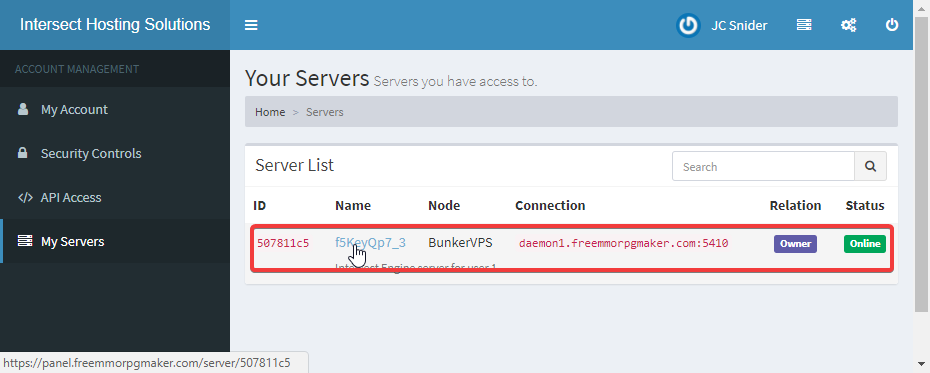


Your server page will load where you can Start, Stop, Restart, or Kill your Intersect Server. 

You will also find a console where you can type in server commands. At the very bottom of the page you will find recent cpu and memory usage of your server. 

Was this answer helpful?

Related Articles

How to issue Console Commands to your Server Login to the server management control panel.  If you have trouble logging in we have... How to view Memory/CPU Usage of your Server Login to the server management control panel.  If you have trouble logging in we have... How to Manage Server Files Login to the server management control panel.  If you have trouble logging in we have... How to Setup SFTP File Access If the web browser File Management system doesn't meet your needs you can also setup SFTP access... How to Update Intersect to newer versions Updates are NOT automated. When a new verison of Intersect is released you can manually update...
« Back

Powered by WHMCompleteSolution

  Support

My Support Tickets
Knowledgebase
  • Contact Us

Copyright © 2026 Intersect Cloud. All Rights Reserved.


Loading...
Loading...
Choose language
العربية
Azerbaijani
Català
中文
Hrvatski
Čeština
Dansk
Nederlands
English
Estonian
Persian
Français
Deutsch
עברית
Magyar
Italiano
Macedonian
Norwegian
Português
Português
Română
Русский
Español
Svenska
Türkçe
Українська

Generate Password

Please enter a number between 8 and 64 for the password length